Core workflow

Built around the three jobs crews actually do before departure.

Confirm the aircraft, calculate the load, review performance, and create a usable record of the flight in a workflow that stays clear enough for operational use, with quick unit conversions available when needed.

Weight and balance calculator

Load passengers, baggage, fuel, and custom stations.

Review center of gravity, station totals, and the underlying data table with imperial or metric units that fit the way your operation already runs, plus built-in conversion help for fuel, weight, and other unit changes.

Performance calculator

Run aircraft performance calculations with one-click weather sync.

Pull in current conditions fast, then review the aircraft with performance calculations tied to the weather and operational inputs you actually need.

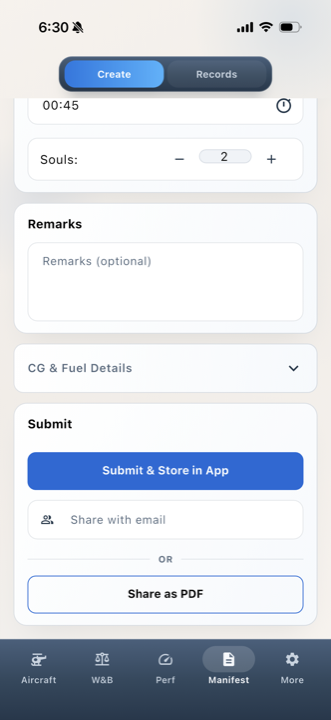
Load manifests

Keep it digital, send a PDF, or do both.

Keep a digital manifest on the flight, generate a PDF instantly, and send it by text or email whenever you need to share it.

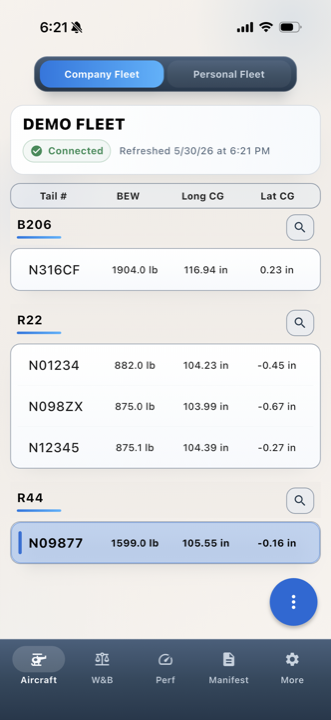
Fleet workflow

Build a personal fleet or connect to a company fleet.

Use a personal fleet for repeat individual flying, or connect to one company fleet that stays current as the single source of truth for the whole operation.

Who it's for

Built for individual pilots, schools, and operators.

Use Flight Token on your own aircraft, build out a personal fleet, or set up a company fleet that stays current for the whole team, with imperial or metric units that match the way your operation runs. Light, dark, and follow-system display modes are also planned for an upcoming update.

For individual pilots

Start free with one aircraft, then grow into a personal fleet or company fleet access.

Individual pilots get the full weight and balance workflow, performance calculations, and PDF manifests whether they are on the free tier or a paid plan. Start free with one aircraft, then move into unlimited personal aircraft or connect to a company fleet when you need more.

For schools and operators

Build a company fleet the whole team can use.

Schools and operators can build a company fleet that becomes the single source of truth for the group, with aircraft updates the whole team can use. If the company wants to pay for the app for the team, the crew plan adds centralized billing and seat management on top of the same product features.

Common questions

Questions pilots and operators usually ask before they switch.

These are the questions that come up most often when pilots, flight schools, and operators are deciding how to replace spreadsheets or fragmented planning workflows.

Weight and balance app

What should I look for in an aircraft weight and balance app?

A strong aircraft weight and balance app should do more than basic math. Flight Token combines visible weight and balance calculations, performance calculations, and load manifests in one workflow so pilots do not have to jump between separate tools.

Inside the app

What do I get in the Flight Token app?

Flight Token gives you weight and balance, performance calculations with one-click weather sync, and digital or PDF load manifests in one app, with imperial or metric units throughout plus built-in conversion tools when you need them. Free and paid plans change aircraft access and fleet scale, not the core planning workflow.

Supported airframes

What airframes are supported?

Current support includes Robinson R22 and R44 configurations plus Cessna 172 variants, and the list is kept current on the supported airframes page as more configurations are added.

Pricing

Is Flight Token free, or what does it cost?

Flight Token has a free tier for one individual aircraft, plus paid individual plans for more aircraft and broader fleet use. Teams that want company-paid access can use crew pricing with centralized billing and seat management.

Who it fits

Is Flight Token for one pilot or a full operation?

Both. An individual can start with one aircraft, build a personal fleet, or connect to a company fleet. A full operation can use a shared company fleet, and the crew plan adds centralized billing and seat management for teams.

How it's different

How is Flight Token different from other weight and balance tools?

Flight Token is built as one operational workflow instead of a single-purpose calculator. It combines weight and balance, performance calculations, digital or PDF manifests, built-in conversion tools, and fleet workflows so crews are not piecing together multiple tools.

Next step

Review pricing, check supported airframes, and start with the app.

Most pilots start by reviewing plans, checking aircraft support, and downloading the app. Teams that want company-paid access can use the crew plan later for billing and seat management.